AG-UI Protocol
Overview
AG-UI is an open, lightweight, event-based protocol that standardizes how AI agents connect to user-facing applications. Built for simplicity and flexibility, it enables seamless integration between AI agents, real-time user context, and user interfaces.
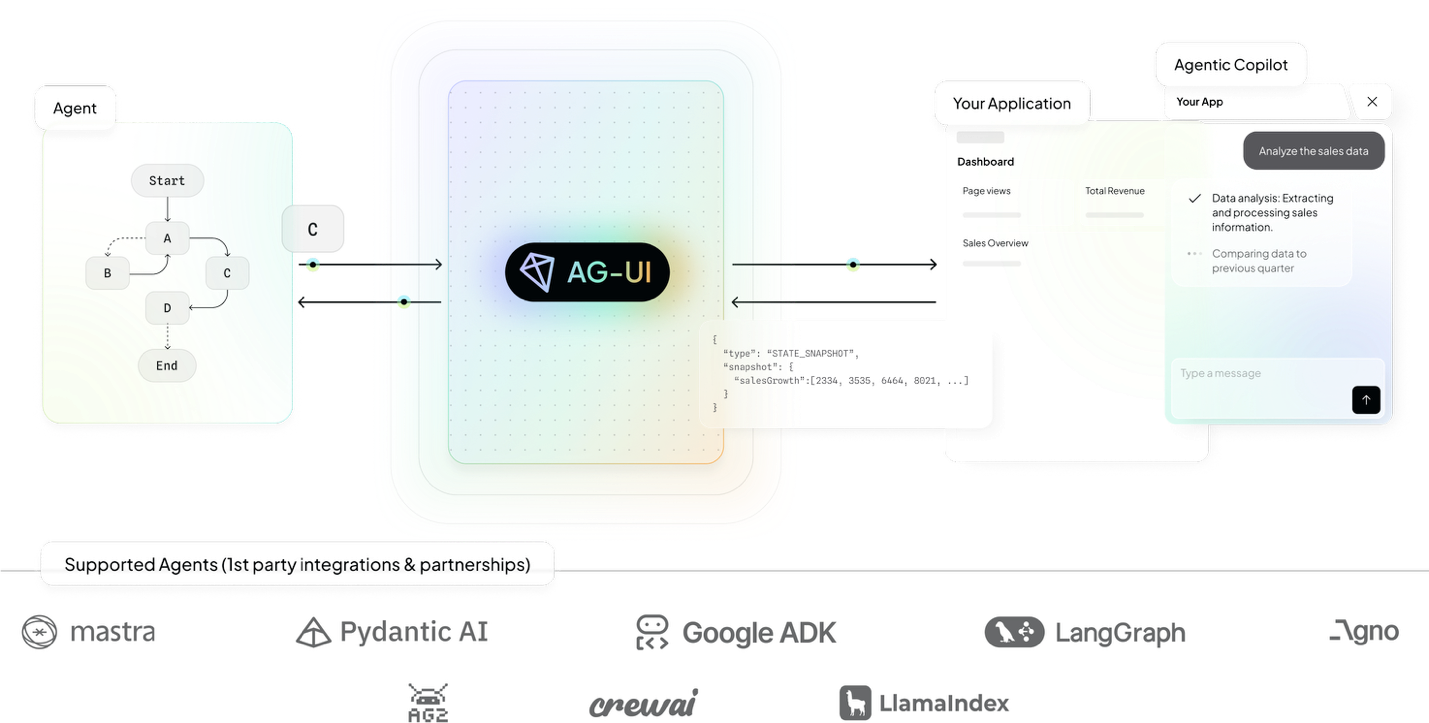
Source: AG-UI Documentation
Development and Collaboration
Original Development
- Originally Built by: Rocket Science team
- Collaborative Contributors: Pydantic AI and CopilotKit teams
- Repository: ag-ui-protocol/ag-ui
- License: Open source protocol
Design Philosophy
AG-UI was designed with a focus on simplicity and developer experience, making it easy for developers to integrate AI agents with user interfaces without complex setup or configuration.
Technical Architecture
Core Principles
Event-Based Communication: - Lightweight Protocol: Minimal overhead for real-time communication - Event-Driven: Based on event-driven architecture patterns - Real-Time: Support for real-time user context and interactions - Bidirectional: Two-way communication between agents and UIs
Simplicity and Flexibility: - Easy Integration: Simple integration process for developers - Flexible Architecture: Adaptable to different UI frameworks and agent systems - Minimal Configuration: Minimal setup and configuration requirements - Developer-Friendly: Designed with developer experience in mind
Protocol Components
Agent Interface: - Agent Registration: Agents register their capabilities and interfaces - Event Handling: Agents handle events from user interfaces - Context Management: Agents maintain and update user context - Response Generation: Agents generate responses to user interactions
UI Interface: - Event Emission: UIs emit events for agent processing - Context Provision: UIs provide real-time user context to agents - Response Handling: UIs handle and display agent responses - State Synchronization: UIs synchronize state with agent systems
Communication Layer: - Message Routing: Intelligent routing of messages between agents and UIs - Event Serialization: Standardized serialization of events and data - Error Handling: Robust error handling and recovery mechanisms - Performance Optimization: Optimized for low-latency communication
Key Features
Real-Time User Context
- Context Streaming: Real-time streaming of user context to agents
- Context Updates: Dynamic updates of user context as interactions occur
- Context Filtering: Intelligent filtering of relevant context information
- Context Persistence: Persistence of context across sessions and interactions
Seamless Integration
- Framework Agnostic: Works with any UI framework or agent system
- Plugin Architecture: Plugin-based architecture for easy extension
- API Compatibility: Compatible with existing agent and UI APIs
- Migration Support: Easy migration from existing integration approaches
Developer Experience
- Simple Setup: Quick and easy setup process for new integrations
- Clear Documentation: Comprehensive documentation and examples
- Debugging Tools: Built-in debugging and monitoring tools
- Community Support: Active community support and contributions
Use Cases and Applications
Conversational Interfaces
- Chatbots: Integration of AI agents with chat interfaces
- Voice Assistants: Voice-based agent interactions with UI feedback
- Virtual Assistants: Comprehensive virtual assistant implementations
- Customer Support: AI-powered customer support with rich UI interactions
Interactive Applications
- Collaborative Tools: AI agents integrated with collaborative work tools
- Creative Applications: AI-assisted creative tools with real-time feedback
- Educational Platforms: Interactive educational platforms with AI tutoring
- Gaming: AI agents integrated with gaming interfaces and experiences
Enterprise Applications
- Business Intelligence: AI agents integrated with BI dashboards and tools
- Workflow Automation: AI-powered workflow automation with user interfaces
- Decision Support: AI decision support systems with interactive interfaces
- Data Analysis: AI-powered data analysis tools with visualization interfaces
Development Tools
- Code Editors: AI coding assistants integrated with code editors
- Design Tools: AI design assistants integrated with design applications
- Testing Tools: AI testing assistants integrated with testing interfaces
- Documentation: AI documentation assistants integrated with documentation tools
Implementation Guide
Getting Started
Basic Setup: 1. Install AG-UI Library: Install the AG-UI library for your platform 2. Configure Agent: Configure your AI agent to use AG-UI protocol 3. Set Up UI Integration: Integrate AG-UI with your user interface 4. Test Communication: Test communication between agent and UI 5. Deploy and Monitor: Deploy the integration and monitor performance
Example Integration:
// Agent-side integration
import { AGUIAgent } from 'ag-ui-protocol';

const agent = new AGUIAgent({
  name: 'MyAgent',
  capabilities: ['chat', 'analysis', 'recommendations']
});

agent.on('user-message', async (event) => {
  const response = await processUserMessage(event.message);
  agent.emit('agent-response', { response });
});

// UI-side integration
import { AGUIClient } from 'ag-ui-protocol';

const client = new AGUIClient({
  agentEndpoint: 'ws://localhost:8080/agent'
});

client.on('agent-response', (event) => {
  displayResponse(event.response);
});

client.emit('user-message', { message: userInput });
Best Practices
Performance Optimization: - Event Batching: Batch events when appropriate to reduce overhead - Context Filtering: Filter context to include only relevant information - Caching: Implement appropriate caching strategies for better performance - Connection Management: Manage connections efficiently for scalability
Security Considerations: - Input Validation: Validate all inputs from both agents and UIs - Authentication: Implement proper authentication mechanisms - Authorization: Use fine-grained authorization controls - Data Protection: Protect sensitive data in transit and at rest
Error Handling: - Graceful Degradation: Handle errors gracefully without breaking user experience - Retry Logic: Implement retry logic for transient failures - Error Reporting: Provide clear error reporting and debugging information - Fallback Mechanisms: Implement fallback mechanisms for critical failures
Integration with Other Protocols
AG-UI and MCP
- Complementary Roles: AG-UI handles UI integration, MCP handles context provision
- Combined Benefits: Rich user interfaces with comprehensive context access
- Integration Patterns: Use both protocols together for complete agent solutions
- Best Practices: Recommended patterns for using AG-UI with MCP
AG-UI and A2A
- Multi-Agent UIs: Use AG-UI for UI integration in multi-agent systems
- Coordination: Coordinate multiple agents through single UI interface
- User Experience: Provide unified user experience for multi-agent workflows
- Scalability: Scale UI interactions across multiple coordinated agents
Community and Ecosystem
Development Community
- Open Source: Fully open source with community contributions
- GitHub Repository: Active development on GitHub with issue tracking
- Community Forums: Dedicated forums for community discussions
- Regular Updates: Regular updates and feature releases
Ecosystem Partners
- Pydantic AI: Native integration with Pydantic AI framework
- CopilotKit: Integration with CopilotKit development tools
- Rocket Science: Original development and ongoing support
- Community Contributions: Growing ecosystem of community contributions
Tools and Resources
- Documentation: Comprehensive documentation and tutorials
- Examples: Example implementations and use cases
- Templates: Templates for common integration patterns
- Debugging Tools: Tools for debugging and monitoring AG-UI integrations
Future Development
Roadmap
- Enhanced Features: Additional features for richer agent-UI interactions
- Performance Improvements: Continued performance optimization and scaling
- Ecosystem Growth: Expansion of ecosystem partners and integrations
- Standardization: Potential standardization through industry bodies
Research Areas
- Advanced Context: Research on advanced context management techniques
- Multi-Modal: Support for multi-modal interactions (voice, vision, text)
- Personalization: Personalized agent-UI interactions based on user preferences
- Accessibility: Enhanced accessibility features for inclusive design
Resources and Documentation
Official Resources
- Documentation: AG-UI Documentation
- GitHub Repository: ag-ui-protocol/ag-ui
- Examples: Official examples and tutorials
- Community: Community forums and support channels
Learning Materials
- Getting Started Guide: Step-by-step guide for new developers
- Best Practices: Comprehensive best practices documentation
- Case Studies: Real-world case studies and implementations
- Video Tutorials: Video tutorials and demonstrations
Related Sections
- Section 6.1: Agentic AI Foundation (standardization ecosystem)
- Section 6.2: Model Context Protocol (complementary protocol)
- Section 4: Agent Development Frameworks (integration with development tools)
- Section 5.2: Agentic AI Platforms (platform integration considerations)